Pdf to Speech Pro v12.6.3
Requirements: Android 4.0+
Overview: Listen to your your office documents, books, articles and research papers while you drive, run, or walk the dog. Use it to proof-read your papers.
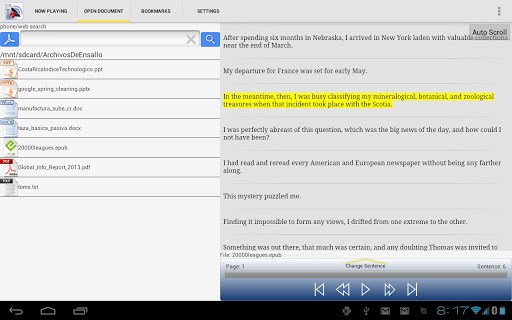
Pdf-to-Speech runs in the background so you can do other tasks while listening to documents. It works like a music player.
Supported formats:
Text files (txt)
Portable Document Format (pdf)
Electronic books (ePub) (DRM eBooks not supported)
Microsoft Word documents (doc)
Microsoft Power Point (ppt)
Web pages (URL link)
Images with text (jpeg,png)
(*Improved*)Website-to-Speech: Pdf-to-Speech can read website pages.
Ideal for articles and blogs. Improved to extract just the text related to content.
Download and save your PDF files and plain text file Attachments from the gmail app and other apps. The downloaded file is placed in the Download folder.
Replace Text tool: Replace words or phrases to avoid repetitive, unnecessary phrases. Use it to replace foreign words with more phonetic alternatives. Use it to omit symbols. It can also be used to replace names or words with funny substitutes.
Support for Bluetooth media buttons (single click skips sentences, double click skips pages ).
Gestures: Use gestures to quickly flip pages, advance sentences, and to play and pause the reader. A menu help option informs of the available gesture instructions.
Support for SVOX, IVONA text-to-Speech and other High Fidelity text-to-speech synthesizers.
Integration with Google Drive makes it seamless to hear files and Google docs stored in GDrive.
Accessibility: Pdf-to-Speech has been tested to work with talk-back. The use of hardware buttons such as a Bluetooth headset is recommended to pause the reader before browsing the app using talk-back.
For two-way feedback, discussion and feature requests… follows us on Google+
https://plus.google.com/u/0/b/103037044 … 2429/posts
More video tutorials available on YouTube
Requirements: Android 4.0+
Overview: Listen to your your office documents, books, articles and research papers while you drive, run, or walk the dog. Use it to proof-read your papers.
Pdf-to-Speech runs in the background so you can do other tasks while listening to documents. It works like a music player.
Supported formats:
Text files (txt)
Portable Document Format (pdf)
Electronic books (ePub) (DRM eBooks not supported)
Microsoft Word documents (doc)
Microsoft Power Point (ppt)
Web pages (URL link)
Images with text (jpeg,png)
(*Improved*)Website-to-Speech: Pdf-to-Speech can read website pages.
Ideal for articles and blogs. Improved to extract just the text related to content.
Download and save your PDF files and plain text file Attachments from the gmail app and other apps. The downloaded file is placed in the Download folder.
Replace Text tool: Replace words or phrases to avoid repetitive, unnecessary phrases. Use it to replace foreign words with more phonetic alternatives. Use it to omit symbols. It can also be used to replace names or words with funny substitutes.
Support for Bluetooth media buttons (single click skips sentences, double click skips pages ).
Gestures: Use gestures to quickly flip pages, advance sentences, and to play and pause the reader. A menu help option informs of the available gesture instructions.
Support for SVOX, IVONA text-to-Speech and other High Fidelity text-to-speech synthesizers.
Integration with Google Drive makes it seamless to hear files and Google docs stored in GDrive.
Accessibility: Pdf-to-Speech has been tested to work with talk-back. The use of hardware buttons such as a Bluetooth headset is recommended to pause the reader before browsing the app using talk-back.
For two-way feedback, discussion and feature requests… follows us on Google+
https://plus.google.com/u/0/b/103037044 … 2429/posts
More video tutorials available on YouTube
http://www.youtube.com/user/PdfToSpeech?feature=mhee
What’s in this version:
12.6 (All Android Platforms)
*Feature: Widget with play buttons now available
*Feature: Notification pause, copy buttons (Jelly Bean +)
*Improvement: better language select tool (now shows multiple voices for the same location/language i.e. male/female )
*Accessibility: player recovers voice even if Talk Back has a different voice (for best results use different engine for Talk Back and Pdf-to-Speech )
12.6.3
Bugfixes (reverted one bugfix)
Beta
N/A
Alpha
Pdf Encryptin Support
This app has no advertisements
https://play.google.com/store/apps/details?id=com.practicalapps
Download Instructions:
http://ul.to/27pomn9v
http://ul.to/27pomn9v

No comments:
Post a Comment